
Download Neuralblender – AI Art Generator, Free Online Tool
Overview: What Neuralblender Brings to the Creative Table
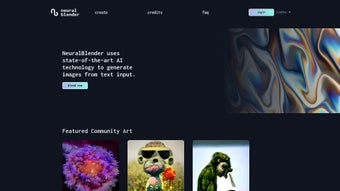
Neuralblender is a cutting‑edge web‑based application that translates plain text prompts into vivid, original artwork using artificial intelligence. Designed for artists, hobbyists, and even marketers looking for quick visual concepts, the platform combines a sleek, browser‑only interface with a powerful diffusion model that can render anything from surreal landscapes to minimalist icons. Because it runs entirely in the cloud, there’s no need to install heavyweight software on a PC or Mac; all you need is a modern browser with JavaScript enabled.
The service also offers a community gallery where users can browse and like creations from around the globe, fostering a collaborative environment that encourages experimentation. While Neuralblender does not yet provide native mobile apps, its responsive design works well on tablets and larger phones, making it a flexible option for on‑the‑go brainstorming sessions. The platform’s credit‑based economy lets users generate a set number of images for free each day, with the option to purchase additional credits for larger projects or higher‑resolution outputs.
In addition, the built‑in queue system ensures that multiple requests are handled smoothly without overloading the server, giving each user a predictable waiting time. Overall, Neuralblender stands out as a secure, free‑to‑start AI art creation tool that balances accessibility with a professional‑grade output quality, making it an attractive choice for anyone looking to explore the possibilities of AI‑driven design. Moreover, the site continuously updates its model with the latest research, meaning that users benefit from improvements in color fidelity, detail rendering, and prompt comprehension without having to download patches or new versions.
This seamless update process further reinforces its appeal to both casual creators and seasoned designers who demand reliable, up‑to‑date technology.
Core Features & How to Get Started
Feature List
- Text‑to‑image generation powered by state‑of‑the‑art diffusion models.
- Real‑time preview of generated artwork before final download.
- Community gallery showcasing thousands of user‑submitted pieces.
- Queue management system that orders requests and provides estimated wait times.
- Credit‑based system: free daily credits plus purchasable bundles for high‑volume users.
- Resolution options ranging from web‑ready 512×512 up to 2048×2048 for print‑quality prints.
- Style presets (e.g., cyberpunk, watercolor, pixel art) that can be combined with custom prompts.
- Social sharing buttons for quick posting to Twitter, Instagram, and Discord.
- Extensive FAQ and tutorial videos embedded directly on the site.
- Advanced prompt modifiers such as “‑no” for negative prompting and “‑seed” for reproducibility.
- Batch generation mode allowing up to 10 images per request, ideal for mood‑board creation.
Installation & Usage Instructions
Getting started with Neuralblender is straightforward. First, navigate to neuralblender.com using any up‑to‑date browser (Chrome, Firefox, Edge, or Safari). Because the platform is web‑based, there is no software download required; simply ensure that JavaScript is enabled in your browser settings.
Upon landing on the homepage, you’ll see a clean input box labeled “Enter your prompt.” Type a descriptive phrase—such as “a futuristic cityscape at sunset in neon colors”—and select a style preset if desired. Below the prompt field, you can choose the output resolution and the number of images you’d like the AI to generate in one batch. The interface also includes optional sliders for “creativity” and “detail,” giving you granular control over the AI’s interpretation.
After configuring your settings, click the “Generate” button. The system will place your request into the queue, and a progress bar will indicate the estimated wait time. Once the AI finishes processing, thumbnail previews appear; you can click any thumbnail to view a larger version and decide whether to download the image in PNG or JPEG format.
Free users receive a limited number of daily credits, which are automatically deducted for each generated image. If you run out of credits, you can purchase additional bundles via the “Store” tab using a credit card or PayPal. The purchased credits are added instantly to your account, allowing uninterrupted workflow.
For power users, a subscription option is also available that provides unlimited generation with priority queue placement, ensuring that heavy‑duty projects never stall.
For best results, experiment with varied adjectives, art movements, and lighting descriptors. The community gallery also offers inspiration: click on any public artwork to see the original prompt that produced it, then adapt those ideas to your own projects. With a simple sign‑up (email or social login), you can save favorite prompts, track credit usage, and receive notifications when new style presets are released. Additionally, the platform supports exporting a JSON file of your prompt history, which can be imported into other AI tools for cross‑platform experimentation. This level of flexibility makes Neuralblender not only a quick sketching solution but also a valuable asset in larger creative pipelines.
Compatibility, Pros & Cons
Since Neuralblender is a browser‑only service, it is compatible with any operating system that supports modern web standards. This includes Windows 10/11, macOS Monterey and later, Linux distributions with up‑to‑date browsers, as well as Chrome OS. Tablet users on iOS or Android can also access the platform through Safari or Chrome, although the experience is optimized for larger screens. The only hard requirement is an active internet connection and JavaScript enabled, as all heavy processing occurs on remote servers. For organizations concerned about data residency, Neuralblender offers an enterprise tier that can route traffic through regional data centers, ensuring compliance with GDPR and other privacy regulations.
Pros
- Zero installation: No need to download large binaries; everything runs in the browser.
- Free entry level: Daily free credits let new users experiment without spending money.
- High‑quality outputs: Supports up to 2048×2048 resolution suitable for print.
- Community driven: Gallery and prompt sharing spark creativity and learning.
- Secure processing: All images are generated on encrypted servers; no local data storage.
- Flexible pricing: Credit bundles cater to occasional creators and heavy‑duty designers alike.
- Regular model updates: New artistic styles and improved fidelity are rolled out automatically.
- Batch generation: Create multiple variations in a single request, saving time on mood‑boards.
Cons
- Requires constant internet: Offline generation is not possible.
- No dedicated mobile apps: While responsive, the lack of native apps limits push notifications and deep‑link sharing.
- Queue wait times: During peak usage, the system may impose longer delays for free users.
- Limited prompt length: Very long descriptions are truncated, which can affect nuance.
- Credit management: Users must monitor credit balance to avoid unexpected interruptions.
- Data retention policy: Generated images are only stored temporarily unless you publish them, which may be inconvenient for quick backup.
Overall Rating: 4.5 / 5 – Neuralblender offers a robust, free‑first AI art experience with a smooth web interface, though the lack of a mobile app and occasional queue delays keep it from a perfect score.
FAQ and Final Thoughts
Is Neuralblender completely free to use?
Neuralblender offers a free tier that provides a limited number of daily credits. Users can generate a few images each day without paying. For higher‑volume needs or higher‑resolution outputs, credit bundles can be purchased, and a subscription option is also available for unlimited generation.
Do I need to install any software?
No. Neuralblender runs entirely in the browser, so there’s nothing to download or install. Just open the site, enable JavaScript, and you’re ready to create.
Can I use Neuralblender on a mobile device?
Yes, the website is responsive and works on modern mobile browsers, though there is currently no dedicated iOS or Android app. The mobile experience is optimized for portrait orientation, but complex prompt editing may be easier on a desktop.
How does the credit system work?
Each generated image consumes one credit. Free users receive a set amount each day, while paid users can buy credit packs that add to their balance. Credits are deducted automatically when you click “Generate,” and any unused credits roll over to the next day.
Is my artwork stored on Neuralblender’s servers?
Generated images are temporarily stored for download. After you download, the files are not retained permanently unless you choose to publish them in the community gallery. For enterprise users, an optional secure archive can be enabled.
What privacy measures protect my prompts and images?
All communications are encrypted via HTTPS, and prompts are not logged in a personally identifiable way. The platform complies with GDPR and offers a data‑deletion request feature for registered accounts.
Conclusion: Should You Download Neuralblender?
If you’re searching for a fast, secure, and cost‑effective way to turn text ideas into visual assets, Neuralblender delivers a compelling solution. Its browser‑only architecture eliminates the hassle of installations, while the free daily credits let newcomers experiment without financial commitment. The community gallery adds a social dimension that can spark fresh concepts, and the credit‑purchase model scales smoothly for professionals who need larger batches or higher resolutions.
Although the platform lacks a native mobile app and occasional queue times can be a minor inconvenience, these drawbacks are outweighed by the quality of the AI‑generated artwork and the ease of use. For designers, marketers, educators, or hobbyists wanting to explore AI‑driven creativity, Neuralblender is a top‑tier choice. Click the link below to start generating your first masterpiece today and see how quickly a simple prompt can become a stunning visual asset.



.png)



